Asset Management
Platform administrators oversee all assets contributed to Forest Stack. Through the management tools available under Manage Platform → Users and Contributions, admins can review, verify, update, and moderate datasets, models, and use cases submitted by Providers.
Manage Platform → Users and Contributions → Contributions
In the Contributions section, platform admins can view and manage every asset uploaded to Forest Stack. The contributions table provides key information, including:
- Asset Name – The title of the dataset submitted for upload.
- Asset Type – Indicates whether the submission is a Dataset, Model, or other supported asset.
- Permission (Open, Restricted) – Defines whether users can download the asset freely or only after approval.
- Item Status (Active, Inactive) – Shows whether the asset is currently active on the platform or not.
- Verified(True,False) – Indicates whether the asset has been reviewed and approved by the Organisation Manager or platform administrator for publication
- Published On – The date when the provider initiated the upload request.
- Uploaded By – Shows the name of the user or organisation that submitted the asset to Forest Stack.
- Verified By – Displays the name of the administrator or Organisation Manager who reviewed and approved the asset.
- Action – Options for the admin to view and update asset details, hide/unhide the asset, and delete the asset.
Actions Available
Under the Action column, platform administrators can:
- View & Edit Asset Details – Allows the admin to review and modify the metadata and settings of the selected asset.
- Hide / Unhide an Asset from the Platform – Controls whether an asset is visible or hidden from end users.
- Delete an Asset from Forest Stack – Permanently removes the asset and its associated content from the platform.
These controls help ensure that only accurate, compliant, and approved assets remain visible to users.
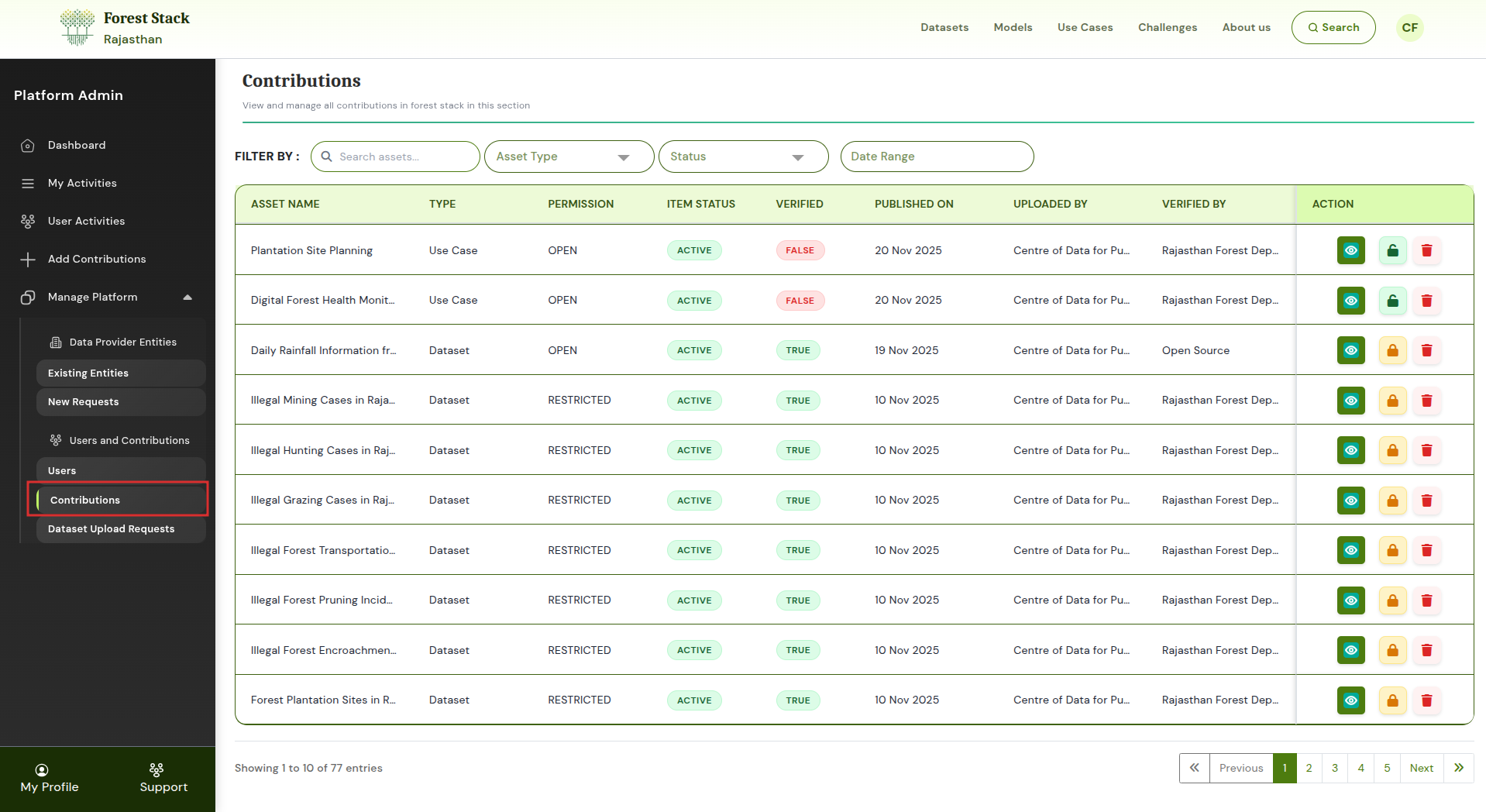
Contributions
Manage Platform → Users and Contributions → Dataset Upload Requests
The Dataset Upload Requests section allows platform admins to review requests from Providers who upload datasets via SFTP or API.
Each request in the table displays:
- Asset Name: The title of the dataset submitted for upload.
- Type: Indicates whether the submission is a Dataset, Model, or other supported asset.
- Permission: (Open, Restricted) Defines whether users can download the asset freely or only after approval.
- Asset Status: (Active, Inactive) Shows whether the asset is currently active on the platform or not.
- Type: (SFTP, API) Specifies the method used by the provider to submit the dataset.
- Request Status: (Granted, Pending, Rejected) Displays the current approval state of the upload request.
- Requested On: The date when the provider initiated the upload request.
- Action: Options for the admin to view details, approve, or reject the request.
Actions Available
In the Action column, admins can:
- View Details of the Upload Request – Opens the full submission information, including metadata and upload method.
- Approve the Dataset Upload – Accepts the submission, allowing the dataset to proceed to publishing.
- Reject the Request – Declines the upload submission and prevents the dataset from being added to the platform.
This ensures that all SFTP/API dataset uploads are validated before being published on Forest Stack.
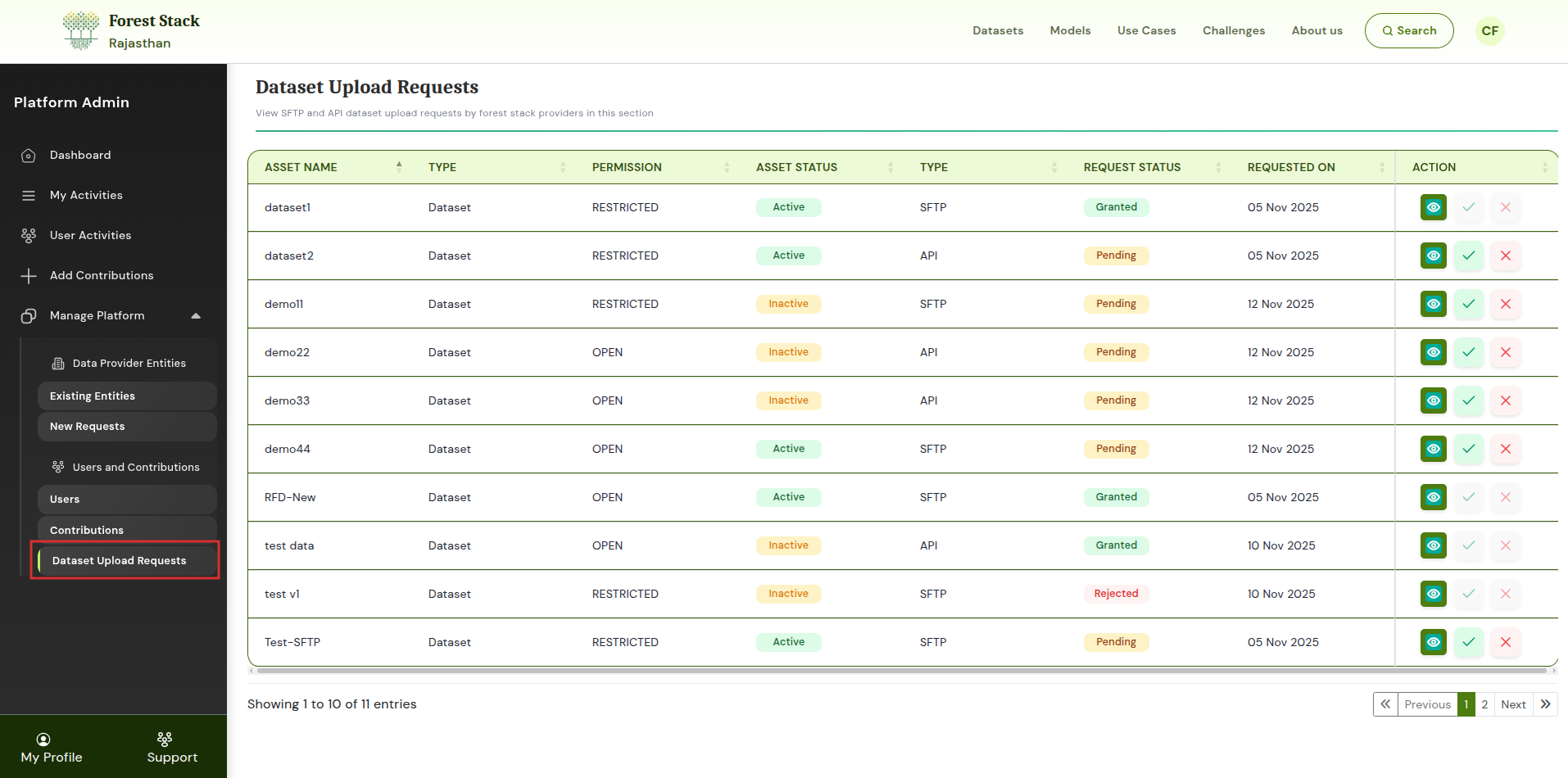
Dataset Upload Requests
Through these tools, platform administrators maintain quality, transparency, and control over all assets contributed to Forest Stack.